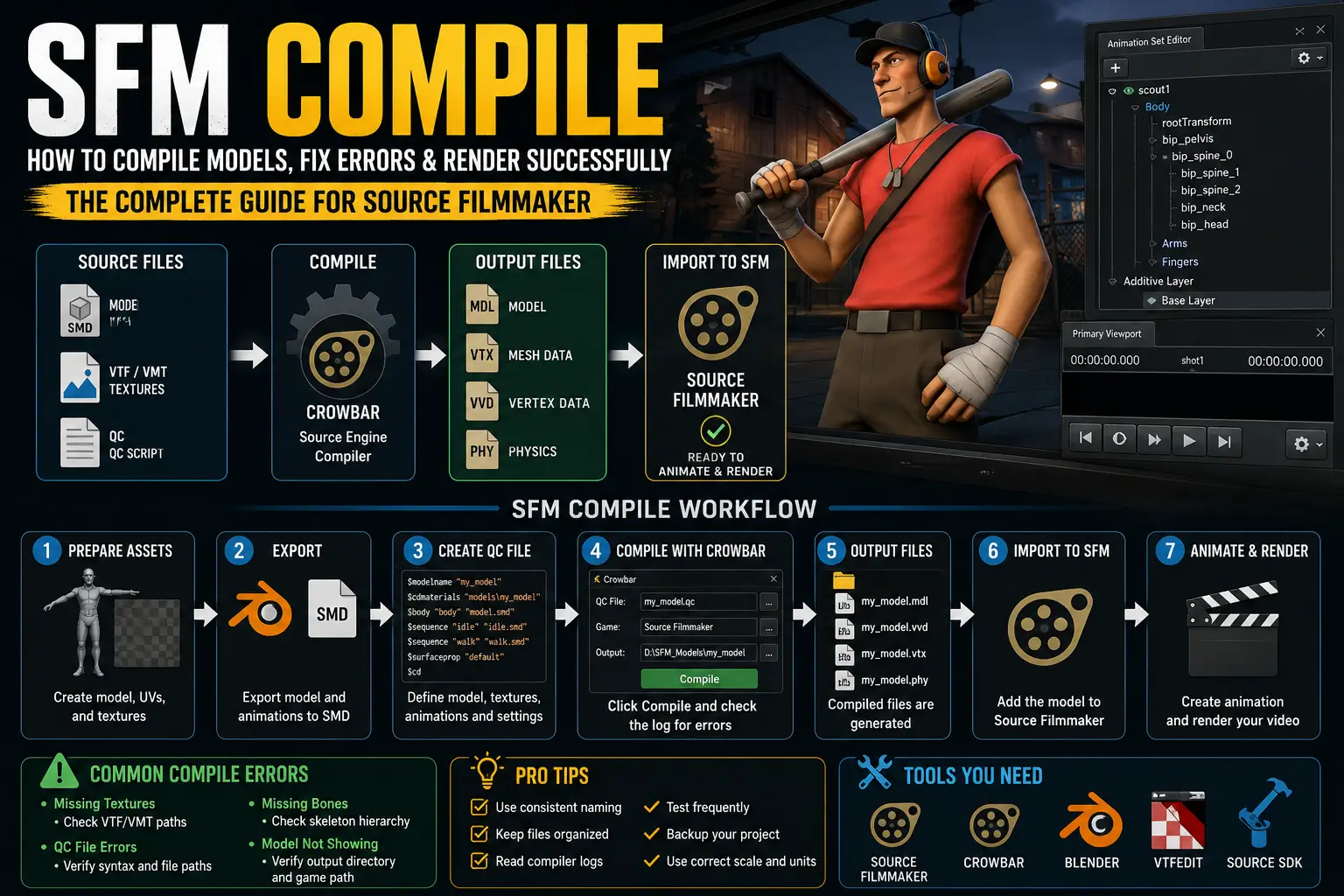
If you’ve started creating custom models, animations, or maps in Source Filmmaker (SFM), you’ve probably encountered the term SFM Compile. Simply put, SFM Compile is the process of converting your source files into a format that Source Filmmaker can read and use. Whether you’re importing a custom character, compiling textures, or preparing animations, understanding this workflow is essential for creating professional-quality projects.
Many beginners struggle with missing textures, broken models, QC file errors, or failed compilations because the Source Engine pipeline differs from modern game engines. This guide explains everything you need to know—from what SFM Compile means to fixing common errors—using simple, beginner-friendly language.
What Is SFM Compile?
SFM Compile is the process of converting source assets into Source Engine-compatible files so they can be used inside Source Filmmaker.
During compilation, Source Filmmaker—or external tools like Crowbar—transforms files such as:
- 3D models
- Animations
- Textures
- Materials
- Physics data
into optimized formats recognized by the Source Engine.
Think of compiling like exporting a finished document. Your raw files are edited and prepared, then compiled into a format that SFM understands.
Without compiling, Source Filmmaker cannot properly load custom assets.
Why Is SFM Compile Important?
Compilation serves several purposes:
- Converts editable files into Source Engine format
- Optimizes models for rendering
- Links textures correctly
- Creates collision models
- Defines animations
- Improves performance
- Prevents loading errors
Whether you’re creating a short animation or a cinematic project, proper compilation ensures your assets work exactly as intended.
How the SFM Compile Process Works
Understanding the workflow makes troubleshooting much easier.
The typical pipeline looks like this:
- Create your model in Blender, Maya, or another 3D application.
- Export the model as an SMD or DMX file.
- Prepare textures and materials.
- Create or edit a QC (compile script) file.
- Use Crowbar or Source SDK tools to compile.
- Place the compiled files into the correct Source Filmmaker directories.
- Load the model inside SFM.
Each stage depends on the previous one, so even a small mistake can prevent successful compilation.
Tools You Need Before Compiling
Most creators use the following tools.
Source Filmmaker
The main application where you’ll animate and render your projects.
Crowbar
Crowbar is the most popular Source Engine compiler and decompiler. It simplifies model compilation and allows creators to compile QC files without using command-line tools.
Many SFM artists rely on Crowbar because of its user-friendly interface and compatibility with Source Engine assets.
Blender
Blender is commonly used to:
- Create models
- Edit meshes
- Rig skeletons
- Prepare animations
Although optional, Blender is one of the most widely supported modeling tools in the SFM community.
VTFEdit
Textures must often be converted into Valve Texture Format (VTF).
VTFEdit allows you to:
- Convert PNG files
- Generate VTF textures
- Create VMT material files
Without proper textures, compiled models often appear purple-and-black or completely invisible.
Source SDK
Some advanced workflows require Source SDK utilities for compiling maps, models, or other Source Engine assets.
Understanding QC Files
One of the most confusing parts of SFM Compile is the QC file.
A QC file is a text script that tells the compiler:
- Which model to compile
- Where textures are located
- Which animations to include
- Physics settings
- Surface properties
- Collision models
- Output location
Think of it as an instruction manual for the compiler.
If your QC file contains incorrect paths or commands, compilation usually fails.
Understanding SMD Files
SMD stands for Studio Model Data.
These files contain:
- Mesh data
- Skeleton information
- Animation data
- Vertex weights
Most custom models exported from Blender eventually become SMD files before compilation.
Materials and Textures
Source Filmmaker separates textures from models.
The system uses:
- VTF – Texture images
- VMT – Material definitions
Both files must exist in the correct folders.
If they’re missing, your model may display:
- Purple checkerboards
- Missing materials
- Invisible surfaces
Step-by-Step: How to Compile a Model in SFM
Follow these steps for a successful compilation.
Step 1: Prepare Your Model
Ensure:
- Clean geometry
- Correct scale
- Proper armature
- Applied transforms
Poor model preparation often causes compile errors later.
Step 2: Export to SMD
Export:
- Reference mesh
- Animations
- Physics mesh (if required)
Keep file names organized to simplify the workflow.
Step 3: Create the QC File
Define:
- Model name
- Texture paths
- Animation references
- Collision model
- Output directory
Double-check every file path before compiling.
Step 4: Open Crowbar
Select:
- Compile
- QC file location
- Game directory
- Output folder
Click Compile.
Crowbar will display any warnings or errors.
Step 5: Review the Output
If compilation succeeds, you’ll receive files such as:
- MDL
- VVD
- PHY
- VTX
These belong inside the appropriate Source Filmmaker model folders.
Step 6: Test Inside SFM
Launch Source Filmmaker.
Load your model.
Check:
- Textures
- Bones
- Animations
- Lighting
- Physics
Testing immediately helps identify problems before starting a larger project.
Common SFM Compile Errors
Most beginners encounter the same issues.
Missing Textures
Symptoms:
- Purple checkerboard model
- Invisible surfaces
Solution:
- Verify VTF files
- Check VMT material paths
- Confirm folder structure
QC File Errors
Symptoms:
- Compilation stops immediately
- Script errors
Solution:
- Review syntax
- Correct file paths
- Check quotation marks
- Remove unsupported commands
Missing Bones
Symptoms:
- Broken animations
- Distorted characters
Solution:
Ensure the skeleton exported correctly from Blender or your modeling software.
Invalid Model Path
Symptoms:
Model won’t appear inside Source Filmmaker.
Solution:
Verify that compiled files were copied into the correct directory.
Animation Problems
Symptoms:
Animations fail to load.
Solution:
Check:
- Animation names
- Bone hierarchy
- Frame rate
- Export settings
Best Practices for Successful SFM Compiles
Professional creators follow consistent habits.
Keep Files Organized
Store:
- Models
- Textures
- QC files
- Animations
in clearly labeled folders.
Name Files Consistently
Avoid spaces or unusual characters.
Good example:
hero_idle.smdInstead of:
My New Hero Idle FINAL v4.smdTest Frequently
Compile after small changes instead of waiting until your project is finished.
Small tests make debugging much easier.
Backup Your Project
Always keep backups before making major edits.
Version control prevents accidental data loss.
Read Compiler Logs
Crowbar provides detailed error messages.
Rather than guessing, read the log carefully—it usually points directly to the problem.
Advanced Tips for Experienced Users
Once you’re comfortable with the basics, consider:
- Optimizing polygon counts
- Using Level of Detail (LOD) models
- Creating custom physics meshes
- Organizing materials efficiently
- Reusing skeletons for animations
- Automating repetitive compile tasks
These improvements help larger projects run more efficiently.
Common Beginner Mistakes
Avoid these common pitfalls:
- Incorrect folder structure
- Forgetting VMT files
- Broken QC paths
- Wrong export settings
- Missing skeletons
- Incorrect texture names
- Compiling before testing
Learning these early saves hours of troubleshooting.
Frequently Asked Questions
What does SFM Compile mean?
SFM Compile is the process of converting source assets into Source Engine-compatible files that Source Filmmaker can load and render.
Which program compiles SFM models?
Most creators use Crowbar, although Source SDK tools can also compile Source Engine assets.
Why does my compiled model appear purple?
Purple-and-black textures usually indicate missing or incorrectly linked VTF or VMT files.
What is a QC file?
A QC file is a script that instructs the compiler how to build your model, including textures, animations, physics, and output settings.
Can Blender export directly to SFM?
Blender exports source files such as SMD or DMX. These still need to be compiled before Source Filmmaker can use them.
Is Crowbar free?
Yes. Crowbar is a free utility widely used by the Source Engine modding and Source Filmmaker communities.
Final Thoughts
Learning SFM Compile is one of the most valuable skills for anyone creating custom content in Source Filmmaker. While the process may seem technical at first, understanding how models, textures, QC files, and compiler tools work together makes troubleshooting much easier.
By following a structured workflow, organizing your project files, and carefully reviewing compile logs, you can avoid many of the common mistakes that frustrate new creators. Whether you’re building custom characters, importing animations, or preparing cinematic scenes, mastering the compile process will help you create smoother, more professional Source Filmmaker projects.

Team Unicode to Krutidev builds and maintains the Hindi typography tools on this site, including this converter. He works with Devanagari font encodings, Remington keyboard layouts, and legacy to Unicode migration for typists and DTP professionals across India.