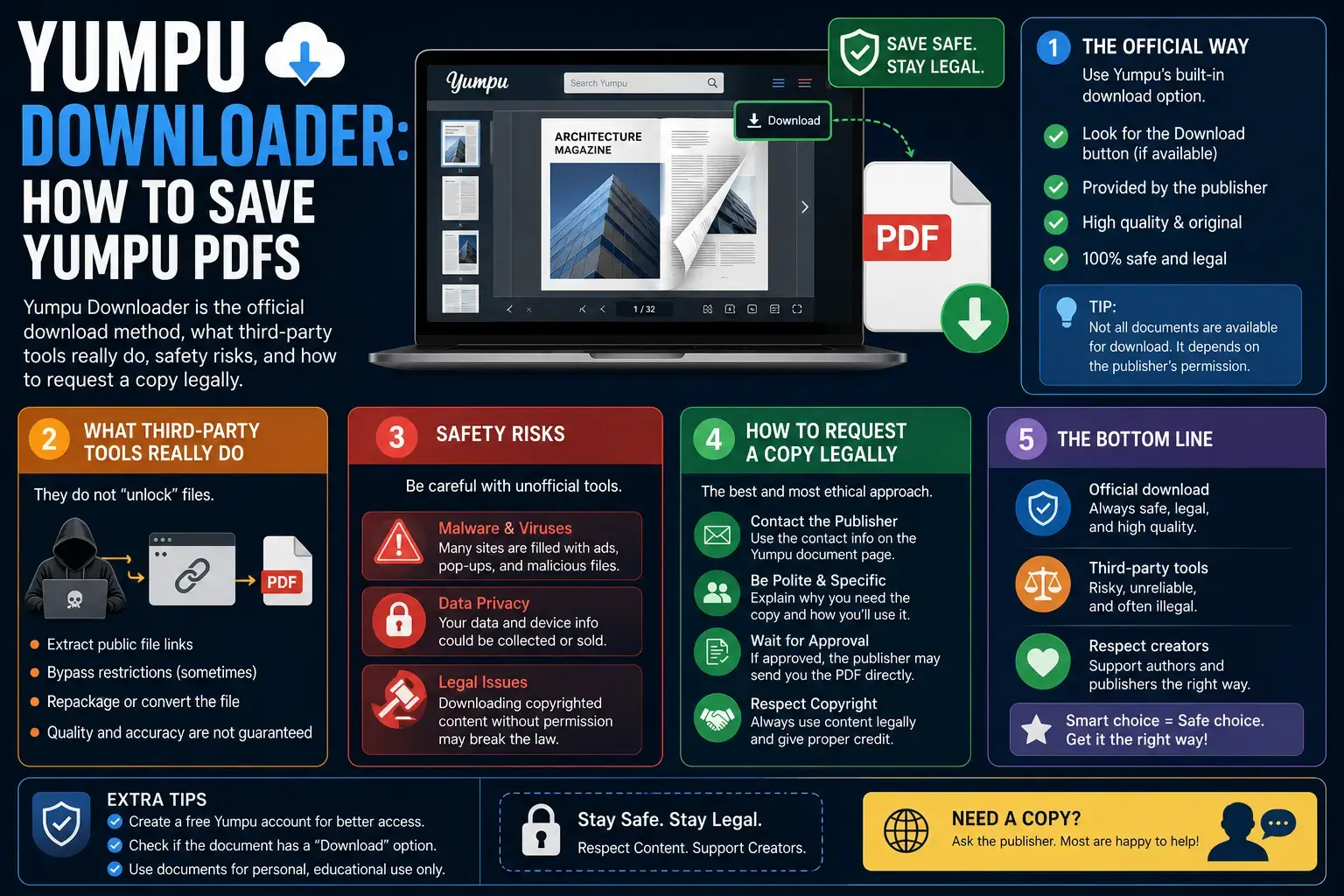
A Yumpu downloader is any method used to save a Yumpu flipbook as a PDF or image file. The honest answer most guides skip: Yumpu already has a built-in download button, and it appears only when the publisher has enabled downloads. This guide shows the official method first, explains what third-party downloader tools actually do, covers the real safety and legal risks, and gives you a working plan when the download button is missing.
What Is a Yumpu Downloader?
A Yumpu downloader is a tool or method that saves a Yumpu publication to your device as a PDF or set of images. Yumpu is a digital publishing platform that turns PDF files into HTML5 flipbooks, so magazines, catalogs, yearbooks, and brochures can be read in a browser without any plugin.
Here is the part that matters. Yumpu itself has a download feature built in. When a publisher uploads a document, they choose whether readers can download it. If downloads are on, a download button appears in the flipbook toolbar, and no external tool is needed at all.
So “Yumpu downloader” really means two very different things:
- The official route: using Yumpu’s own download button on documents where the publisher allows it.
- Third-party tools: external websites that try to reassemble a flipbook into a PDF, usually aimed at documents where the publisher turned downloads off.
Those two things carry completely different risk. This guide treats them separately.
How to Download a Yumpu Magazine (Official Method)
This is the fastest, safest, and highest-quality method. It works whenever the publisher has enabled downloads, and it takes under a minute.
Step 1. Check Download Permission
Open the publication on Yumpu and look at the flipbook toolbar, usually along the bottom or side of the reader. Yumpu’s own help documentation confirms the first step is to verify whether the publisher has enabled downloads for that magazine. If a download icon is visible, you are done checking.
Step 2. Click the Download Button
Select the download icon in the toolbar. Yumpu prepares the original PDF that the publisher uploaded, which means you get full text quality, working links, and selectable text rather than flat images.
Step 3. Save and Verify the File
The PDF saves to your device’s downloads folder. Open it and check that page count and text match the online flipbook. If you are on mobile, the file lands in your browser’s download location and can be moved into any PDF reader.
Why this method wins: you receive the publisher’s original PDF file. Third-party tools stitch together page images, which produces larger files, blurry text at zoom, no selectable or searchable text, and broken hyperlinks. Quality is not close.
How Yumpu Downloader Works
The tool identifies Yumpu’s page-serving architecture, which delivers individual page images through a CDN with predictable URL patterns, and downloads every page at the maximum resolution available. Pages are assembled into a single PDF that preserves the original layout, color accuracy, and page order.
Downloading Your Own Yumpu Uploads
If the document is one you published, log in to your Yumpu account, open your dashboard, and download the source file from your publication list. You always have access to your own uploads regardless of the public download setting.
Why the Download Button Is Missing
When there is no download icon, it is not a bug or a paywall trick. The publisher deliberately turned that option off. Common reasons include:
- Copyright protection. Magazines, books, and paid catalogs are commercial products. Publishers restrict downloads to protect sales.
- Paid or subscription content. Some issues are sold individually or bundled with a subscription.
- Client or internal documents. Brochures and reports shared for viewing only, not redistribution.
- Tracking and analytics. Publishers who want readership data prefer on-platform reading.
That distinction is the single most important thing on this page. A missing download button is a decision, not an obstacle to route around.
Third-Party Yumpu Downloader Tools: An Honest Assessment
Search for “Yumpu downloader,” and you will find a long list of free online tools promising one-click PDFs. Here is what they actually do and what you are accepting when you use them.
How They Work
Most of these tools paste your Yumpu URL into a server that requests each page image from Yumpu’s content delivery network and stitches them into a PDF. Some are browser extensions or scripts that do the same thing locally. None of them recover the original PDF, because that file is not exposed publicly when downloads are disabled.
What You Actually Get
| Aspect | Official Yumpu Download | Third-Party Tool Output |
|---|---|---|
| File type | Publisher’s original PDF | Images wrapped in a PDF shell |
| Text | Selectable and searchable | Flat image, no text layer |
| Quality at zoom | Sharp, vector text | Pixelated, screen-resolution |
| Hyperlinks | Working | Dead |
| File size | Optimized | Often much larger |
| Reliability | Consistent | Breaks when Yumpu updates its player |
The Risks Nobody Lists
- Malvertising and fake buttons. Free downloader sites monetize through aggressive ad networks. Multiple fake “Download” buttons on one page is standard, and clicking the wrong one can start an unwanted installer.
- Data exposure. Server-side tools receive the URL of every document you process. If the document is confidential or internal, you have just handed it to a third party.
- Browser extension permissions. Downloader extensions often request permission to read and change data on all sites, which is far beyond what the stated function needs.
- Constant breakage. These tools depend on Yumpu’s page structure. When Yumpu updates its player, tools break, and abandoned domains get sold on to worse operators.
- Legal exposure. Bypassing a download restriction that a publisher deliberately set is not the same as saving a freely offered file.
Straight answer: if a publication has downloads disabled, the honest options are to ask the publisher, read it on Yumpu, or find the document elsewhere legitimately. Tools that promise to bypass that setting are not solving a technical problem for you, they are transferring a legal and security risk onto you.
Is Downloading From Yumpu Legal?
The answer depends entirely on permission, and it splits cleanly into three cases.
| Situation | Status | What to Do |
|---|---|---|
| Download button is visible | Clearly fine | Use Yumpu’s own button |
| You published the document | Clearly fine | Download from your dashboard |
| Downloads disabled by publisher | Not yours to take | Request permission from the publisher |
Uploading a document to Yumpu does not surrender copyright. The person or company that made the publication still owns it, and the download toggle is how they express what they permit. Working around that setting means copying a protected work against the owner’s stated wishes, which in many jurisdictions also touches rules against circumventing technical protection measures. Redistributing the result, sharing it publicly, or reuploading it elsewhere adds a separate and more serious layer of infringement.
Personal offline reading of a document you already have legitimate access to is a much softer case than redistribution, but “softer” is not the same as permitted. The safe line is simple: if the publisher gave you a button, use it. If they did not, ask.
What to Do When You Cannot Download
Practical alternatives that actually solve the underlying need.
1. Ask the Publisher Directly
This works far more often than people expect, especially for yearbooks, university publications, association newsletters, and company brochures. Most Yumpu publications list the publisher’s profile or website. A short message explaining that you need an offline copy for study, accessibility, or archival purposes usually gets a PDF by email. Publishers restrict public downloads to stop mass redistribution, not to block one genuine reader.
2. Check if the PDF Exists Elsewhere
Many Yumpu documents are republished copies of files that are already public. Search the exact publication title plus “PDF”, and check the publisher’s own website, an institutional repository, or an official archive. Yearbooks and annual reports are frequently hosted directly by the organisation as well.
3. Read Offline Within the Browser
For occasional offline reading, your browser’s built-in print preview or reading tools can hold a temporary copy of a page you already have access to. This suits personal reference and does not create a redistributable file.
4. Use Yumpu’s Paid Features When Relevant
If you are the publisher, Yumpu’s paid plans include control over downloads, private publications, and access settings. If you regularly need offline distribution of your own material, configuring it correctly at publishing time removes the problem entirely.
Frequently Asked Questions
Is there an official Yumpu downloader?
Yes. Yumpu has a built-in download button inside the flipbook reader. It appears only when the publisher has enabled downloads for that publication. When you see it, that is the official downloader, and it gives you the original PDF file.
Why can’t I download some Yumpu magazines?
Because the publisher turned downloads off for that document. It is a deliberate setting, usually to protect copyrighted or commercial content, paid issues, or client material. The reader still works normally; only the download option is removed.
Are third-party Yumpu downloader tools safe?
They carry real risks. Most are ad-funded sites with misleading download buttons, some are browser extensions requesting broad permissions, and server-side tools see the URL of every document you process. Output quality is also poor because they stitch page images rather than recovering the original PDF.
Is it legal to download a Yumpu document?
If the download button is visible, yes. If it is your own upload, yes. If the publisher disabled downloads, copying the document against that setting is not permitted, and sharing or reuploading it is a clearer infringement. Request permission from the publisher instead.
How do I download my own Yumpu publication?
Log in to your Yumpu account and open your dashboard. Your uploaded publications are listed there with access to the source files, regardless of the public download setting you chose for readers.
Can I download a Yumpu magazine on Android or iPhone?
Yes, when downloads are enabled. Open the publication in your mobile browser and tap the download icon in the reader toolbar. The PDF saves to your device’s downloads folder and can be opened in any PDF reader app.
What quality do downloader tools produce compared to the official file?
Noticeably worse. The official download gives you the publisher’s original PDF with selectable text, working links, and sharp rendering at any zoom. Third-party tools assemble screen-resolution page images, so text cannot be selected or searched, links are dead, and pages blur when zoomed.
How do I ask a publisher for a PDF copy?
Open the publisher’s profile from the publication page and find their website or contact details. Send a short message with the publication title and issue, explain why you need an offline copy, and confirm it is for personal use. Institutions, schools, and associations respond most of the time positively.

Team Unicode to Krutidev builds and maintains the Hindi typography tools on this site, including this converter. He works with Devanagari font encodings, Remington keyboard layouts, and legacy to Unicode migration for typists and DTP professionals across India.